 6fd9ba20c8
------------------
### Fixes
 * Fix issue: classes should be loaded even the module is disabled
 * Deleting the only Admin user is not allowed
 * Fixes for handling non UTF-8
 * Fix for non-mandatory select boxes are shown as mandatory
845 lines
24 KiB
Markdown
845 lines
24 KiB
Markdown
IceHrm
|
||
===========
|
||
|
||
IceHrm is a [HRM software](http://icehrm.com) which enable companies of all sizes to [manage HR activities](http://icehrm.com)
|
||
properly.
|
||
|
||
Note: IceHrm is now fully compatible with PHP 7
|
||
|
||
Installation
|
||
------------
|
||
* Download the latest release https://github.com/gamonoid/icehrm/releases/latest
|
||
|
||
* Copy the downloaded file to the path you want to install iCE Hrm in your server and extract.
|
||
|
||
* Create a mysql DB for and user. Grant all on iCE Hrm DB to new DB user.
|
||
|
||
* Visit iCE Hrm installation path in your browser.
|
||
|
||
* During the installation form, fill in details appropriately.
|
||
|
||
* Once the application is installed use the username = admin and password = admin to login to your system.
|
||
|
||
Note: Please rename or delete the install folder (<ice hrm root>/app/install) since it could pose a security threat to your iCE Hrm instance.
|
||
|
||
|
||
Upgrade from Previous Versions to Latest Version
|
||
------------------------------------------------
|
||
|
||
* Backup icehrm installation file and DB
|
||
* Remove all folders except icehrm/app from your existing installation
|
||
* Copy all folders except icehrm/app into installation folder
|
||
* Use sql scripts inside 'db_upgrade/(version)' folder to upgrade the icehrm current version
|
||
|
||
|
||
Note: If you are upgrading from older versions of icehrm please note that the icehrm leave module is removed since v13.0
|
||
|
||
|
||
|
||
Following is a list of features supported in each version of icehrm
|
||
-------------------------------------------------------------------
|
||
|
||
### IceHrm Open Source Version
|
||
* IceHrm Core Modules - Both Enterprise and Open source versions developed on same core concept. But the core modules in professional and enterprise versions are more feature rich and updated with latest security improvements.
|
||
* [Company Information Management](http://icehrm.com/compare.php) - Store and manage details about how companies, departments and branches of the organisation are connected
|
||
* Basic [Employee Management](http://icehrm.com) - Store, manage and retrieve employee information when required
|
||
* Time sheets - IceHrm is a [timesheet app](http://icehrm.com) / [Open source timesheet management](http://icehrm.com) application to track time spent by employees on various projects
|
||
* [Attendance Management](http://icehrm.com) - IceHrm can be used as a [attendance management system](http://icehrm.com) effectively for any size a company.
|
||
* [Performance Charts](http://icehrm.com) - Charts for monitoring attendance hours and comparing attendance with time sheets
|
||
* [Travel Management](http://icehrm.com) - Module for managing travel requests
|
||
|
||
|
||
### IceHrm Pro Version | [Buy now for 349.49 USD](http://icehrm.com)
|
||
|
||
IceHrm Profession version (in short IceHrmPro) is the feature rich commercial alternative for icehrm
|
||
open source version. IceHrm Pro supports following features
|
||
|
||
Following features are supported in IceHrm Pro version in addition to the features supported in open source version.
|
||
|
||
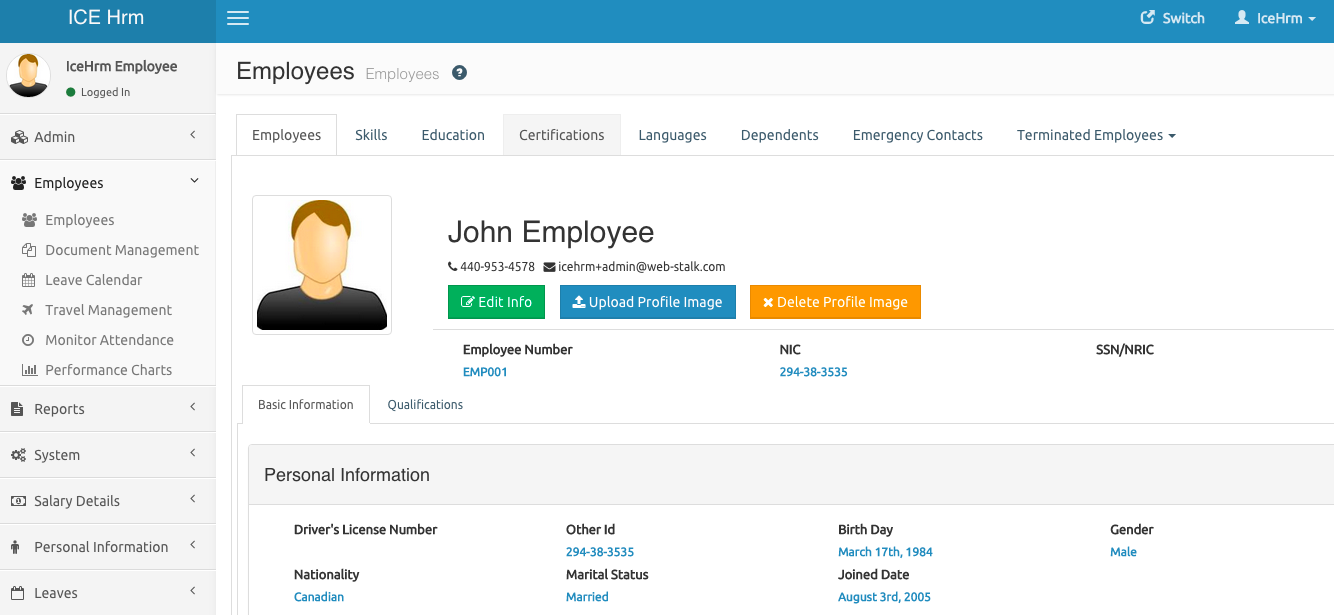
#### Advanced Employee Module
|
||
|
||
|
||
|
||
- Update all employee information without having to switch employees.
|
||
- Search employee skills, qualifications and other information<br/>easily across whole company.
|
||
- Terminate employees while keeping data in system.
|
||
- Re-enable temporarily terminated employees with one click.
|
||
- Employee archive feature to archive data of terminated employees.
|
||
|
||
#### Leave Management
|
||
|
||
IceHrm [Leave management system](http://icehrm.com) is only available in IceHrm Pro or Enterprise versions. IceHrm leave module is a complete [leave management system](http://icehrm.com) for any type of a company
|
||
|
||
To learn more about leave management in icehrm refer:
|
||
- [Leave Admin Guide](http://blog.icehrm.com/docs/leave-admin)
|
||
- [Configuring Leave Module](http://blog.icehrm.com/docs/leave-setup)
|
||
- [Leave Rules](http://blog.icehrm.com/docs/leave-rules)
|
||
|
||
#### Audit Trial
|
||
|
||
Sometimes you need to access audit trail for your HRM system. Audit module records all the write actions (which alters your HRM system)
|
||
of your employees in a quickly accessible and understandable manor. This help you to identify potential issues with the way employees
|
||
are using the system.
|
||
|
||
#### Expense Tracking
|
||
|
||
[Track Employee Expenses](http://icehrm.com) with expense management module.
|
||
|
||
You can learn more about [IceHrm Pro here](http://blog.icehrm.com/docs/icehrm-pro/)
|
||
|
||
To purchase IceHrmPro please visit [http://icehrm.com/modules.php](http://icehrm.com/modules.php)
|
||
|
||
|
||
### IceHrm Enterprise Version [Starts from 1498 USD](http://icehrm.com)
|
||
|
||
In addition to pro version features icehrm enterprise version includes following features
|
||
|
||
#### Candidate / Recruitment Management
|
||
|
||
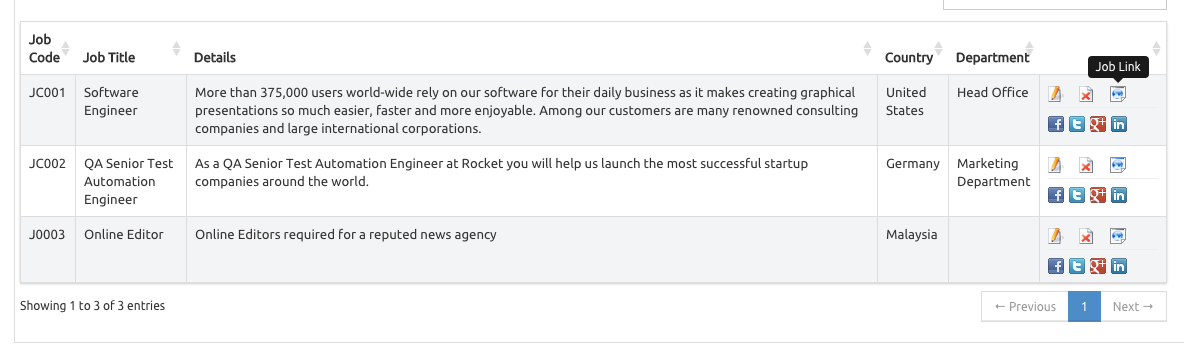
Recruitment module can be used as a [applicant tracking system](http://icehrm.com) or a [recruiting software](http://icehrm.com). IceHrm recruitment management system offers
|
||
following features
|
||
|
||
|
||
|
||
- Post jobs
|
||
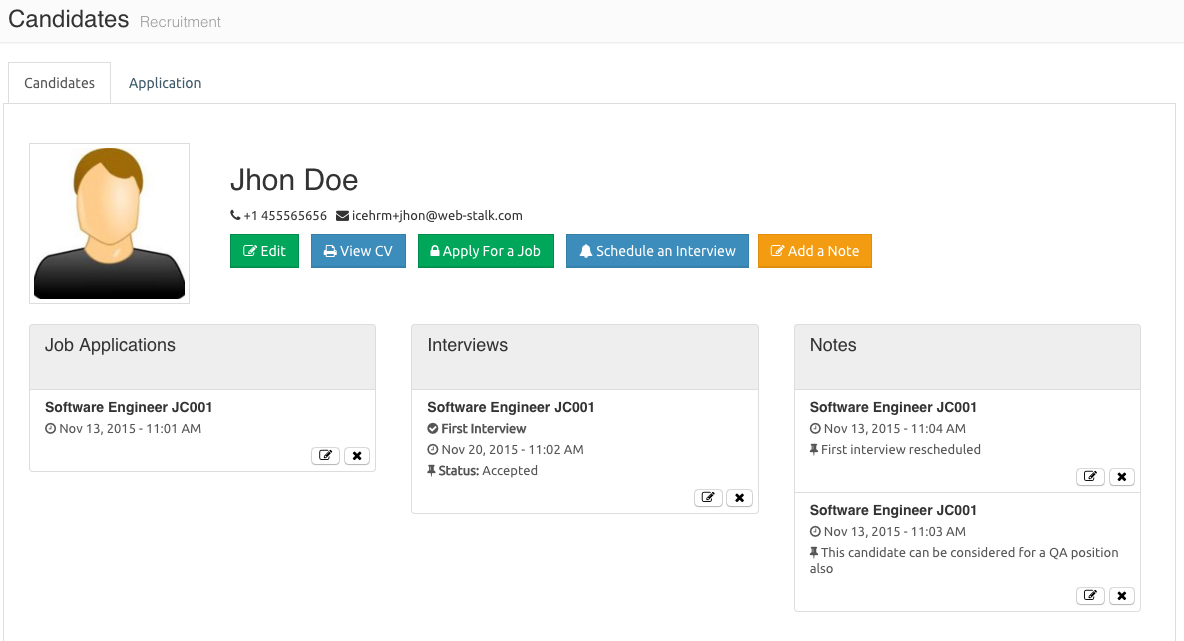
- Let candidates apply for these jobs
|
||
- Schedule interviews
|
||
- Track candidate progress with notes
|
||
- Share job links with linkedIn, facebook, twitter and google+ directly from icehrm
|
||
|
||
|
||
|
||
More about [recruitment module](http://blog.icehrm.com/docs/recruitment/)
|
||
|
||
#### LDAP Support
|
||
|
||
#### Training Management
|
||
|
||
Icehrm [training management system](http://icehrm.com) is for Module for managing courses, training sessions and employee attendance to training sessions.
|
||
|
||
|
||
Your Company Structure (Departments / Branches and other Organization Units)
|
||
-------------------------------------------
|
||
|
||
Company structure module allows you to define the structure of you company by
|
||
creating parent structure of the company, branches, departments and other
|
||
company units. Also it provides a graphical overview of how each of
|
||
your company units are interconnected.
|
||
|
||

|
||
|
||
Employee Management
|
||
-------------------
|
||
|
||
Employees module is used to list, edit, add and search employees in your company.
|
||
You can use the search box to search employees by ID, name or department.
|
||
Also you can use filter button to filter employees by job title, department or supervisor.
|
||
|
||
###Difference Between Users and Employees
|
||
|
||
A user is a person who can login to icehrm. It’s not required for admin users to have an employee attached but
|
||
each non admin user must have an associated employee. Having an employee added in icehrm won’t
|
||
allow the person to login to icehrm. You need to create user with a Manager or Employee user level
|
||
for that employee to be able to login to the system.
|
||
|
||
###Adding Employees
|
||
|
||
Adding employees to ICE Hrm can only be done by the admin. The employee Id field should have a unique value.
|
||
In order to complete adding an employee you need to provide job title, employment status and pay grade.
|
||
These values can be defined in admin: Jobs module.
|
||
|
||
Once an employee is added to the system you will be asked to create a user for the newly added employee
|
||
|
||
###Switching Employees
|
||
|
||
One of the key features of ICE Hrm, is admins and mangers ability to login as another employee.
|
||
This feature can be used to apply leaves, add attendance records or update time sheets behalf of other employees.
|
||
|
||
To login as an employee you can use the switch user icon on employee list or the “Switch Employee” menu in top right hand corner.
|
||
|
||
In open source version you must switch employee to edit employee basic information like skills and qualifications.
|
||
But on Pro and Enterprise versions you can directly update employee information through Advanced Employee Management module.
|
||
|
||
|
||
Settings
|
||
--------
|
||
|
||
After installation the settings module can be accessed by login in as admin and going to System->Settings
|
||
|
||
## Global Settings
|
||
|
||
<div class="mobile-side-scroller">
|
||
<table>
|
||
<thead>
|
||
<tr>
|
||
<th>Setting</th>
|
||
<th>Description</th>
|
||
</tr>
|
||
</thead>
|
||
<tbody>
|
||
<tr>
|
||
<td><p><code>Company: Name</code></p></td>
|
||
<td><p>
|
||
Name of the company
|
||
|
||
</p></td>
|
||
</tr>
|
||
<tr>
|
||
<td><p><code>Company: Logo</code></p></td>
|
||
<td><p>
|
||
|
||
Company logo. You may upload the company logo here.
|
||
Ideally should be 200px wide and height between 50px to 150 px.
|
||
|
||
</p></td>
|
||
</tr>
|
||
<tr>
|
||
<td><p><code>Company: Description</code></p></td>
|
||
<td><p>
|
||
|
||
A short description about the company. Will be used mainly in recruitment module
|
||
|
||
</p></td>
|
||
</tr>
|
||
<tr>
|
||
<td><p><code>Email: Enable</code></p></td>
|
||
<td><p>
|
||
|
||
Set this to "No" to disable all outgoing emails from modules. Value "Yes" will enable outgoing emails
|
||
|
||
</p></td>
|
||
</tr>
|
||
</tbody>
|
||
</table>
|
||
</div>
|
||
|
||
## Email Settings
|
||
|
||
### Configuring Email with SMTP
|
||
|
||
<div class="mobile-side-scroller">
|
||
<table>
|
||
<thead>
|
||
<tr>
|
||
<th>Setting</th>
|
||
<th>Description</th>
|
||
</tr>
|
||
</thead>
|
||
<tbody>
|
||
<tr>
|
||
<td><p><code>Email: Mode</code></p></td>
|
||
<td><p>
|
||
|
||
This should be set to SMTP
|
||
|
||
</p></td>
|
||
</tr>
|
||
<tr>
|
||
<td><p><code>Email: SMTP Host</code></p></td>
|
||
<td><p>
|
||
|
||
If you are using local machine to send emails, set this to localhost. If not set the IP address of the server you are using to send emails
|
||
|
||
</p></td>
|
||
</tr>
|
||
<tr>
|
||
<td><p><code>Email: SMTP Authentication</code></p></td>
|
||
<td><p>
|
||
|
||
Set this to "Yes" if SMTP server authorization is enabled
|
||
|
||
</p></td>
|
||
</tr>
|
||
<tr>
|
||
<td><p><code>Email: SMTP User</code></p></td>
|
||
<td><p>
|
||
|
||
User name of the SMTP user
|
||
|
||
</p></td>
|
||
</tr>
|
||
<tr>
|
||
<td><p><code>Email: SMTP Password</code></p></td>
|
||
<td><p>
|
||
|
||
SMTP user password
|
||
|
||
</p></td>
|
||
</tr>
|
||
<tr>
|
||
<td><p><code>Email: SMTP Port</code></p></td>
|
||
<td><p>
|
||
|
||
Port configured in SMTP server (Default 25)
|
||
|
||
</p></td>
|
||
</tr>
|
||
<tr>
|
||
<td><p><code>Email: Email From</code></p></td>
|
||
<td><p>
|
||
|
||
From email address (e.g icehrm@mydomain.com)
|
||
|
||
</p></td>
|
||
</tr>
|
||
</tbody>
|
||
</table>
|
||
</div>
|
||
|
||
### Configuring Email with Amazon SES
|
||
|
||
<div class="mobile-side-scroller">
|
||
<table>
|
||
<thead>
|
||
<tr>
|
||
<th>Setting</th>
|
||
<th>Description</th>
|
||
</tr>
|
||
</thead>
|
||
<tbody>
|
||
<tr>
|
||
<td><p><code>Email: Mode</code></p></td>
|
||
<td><p>
|
||
|
||
This should be set to SES
|
||
|
||
</p></td>
|
||
</tr>
|
||
<tr>
|
||
<td><p><code>Email: Amazon SES Key</code></p></td>
|
||
<td><p>
|
||
|
||
Amazon access key Id (You can get this through AWS console)
|
||
|
||
</p></td>
|
||
</tr>
|
||
<tr>
|
||
<td><p><code>Email: Amazone SES Secret</code></p></td>
|
||
<td><p>
|
||
|
||
Amazon access key secret
|
||
|
||
</p></td>
|
||
</tr>
|
||
<tr>
|
||
<td><p><code>Email: Email From</code></p></td>
|
||
<td><p>
|
||
|
||
Authorized email address for sending emails through SES
|
||
|
||
</p></td>
|
||
</tr>
|
||
|
||
</tbody>
|
||
</table>
|
||
</div>
|
||
|
||
### Configuring Email with Gmail
|
||
|
||
<div class="mobile-side-scroller">
|
||
<table>
|
||
<thead>
|
||
<tr>
|
||
<th>Setting</th>
|
||
<th>Description</th>
|
||
</tr>
|
||
</thead>
|
||
<tbody>
|
||
<tr>
|
||
<td><p><code>Email: Mode</code></p></td>
|
||
<td><p>
|
||
|
||
This should be set to SMTP
|
||
|
||
</p></td>
|
||
</tr>
|
||
<tr>
|
||
<td><p><code>Email: SMTP Host</code></p></td>
|
||
<td><p>
|
||
|
||
ssl://smtp.gmail.com
|
||
|
||
</p></td>
|
||
</tr>
|
||
<tr>
|
||
<td><p><code>Email: SMTP Authentication</code></p></td>
|
||
<td><p>
|
||
|
||
Yes
|
||
|
||
</p></td>
|
||
</tr>
|
||
<tr>
|
||
<td><p><code>Email: SMTP User</code></p></td>
|
||
<td><p>
|
||
|
||
yourgmailaddress@gmail.com
|
||
|
||
</p></td>
|
||
</tr>
|
||
<tr>
|
||
<td><p><code>Email: SMTP Password</code></p></td>
|
||
<td><p>
|
||
|
||
Gmail password
|
||
|
||
</p></td>
|
||
</tr>
|
||
<tr>
|
||
<td><p><code>Email: SMTP Port</code></p></td>
|
||
<td><p>
|
||
|
||
465
|
||
|
||
</p></td>
|
||
</tr>
|
||
<tr>
|
||
<td><p><code>Email: Email From</code></p></td>
|
||
<td><p>
|
||
|
||
yourgmailaddress@gmail.com
|
||
|
||
</p></td>
|
||
</tr>
|
||
|
||
</tbody>
|
||
</table>
|
||
</div>
|
||
|
||
## Developer Settings
|
||
|
||
<div class="mobile-side-scroller">
|
||
<table>
|
||
<thead>
|
||
<tr>
|
||
<th>Setting</th>
|
||
<th>Description</th>
|
||
</tr>
|
||
</thead>
|
||
<tbody>
|
||
<tr>
|
||
<td><p><code>System: Do not pass JSON in request</code></p></td>
|
||
<td><p>
|
||
|
||
Select Yes if you are having trouble loading data for some tables
|
||
|
||
</p></td>
|
||
</tr>
|
||
<tr>
|
||
<td><p><code>System: Reset Modules and Permissions</code></p></td>
|
||
<td><p>
|
||
|
||
When this is set to “Yes” IceHrm will reset all values given in System->Permissions module. This setting can be used to reload permissions after adding new permissions to module meta.json file
|
||
|
||
</p></td>
|
||
</tr>
|
||
<tr>
|
||
<td><p><code>System: Add New Permissions</code></p></td>
|
||
<td><p>
|
||
|
||
Add new permissions without resetting modules
|
||
|
||
</p></td>
|
||
</tr>
|
||
<tr>
|
||
<td><p><code>System: Debug Mode</code></p></td>
|
||
<td><p>
|
||
|
||
Print debug log messages
|
||
|
||
</p></td>
|
||
</tr>
|
||
</tbody>
|
||
</table>
|
||
</div>
|
||
|
||
## Other Settings
|
||
|
||
<div class="mobile-side-scroller">
|
||
<table>
|
||
<thead>
|
||
<tr>
|
||
<th>Setting</th>
|
||
<th>Description</th>
|
||
</tr>
|
||
</thead>
|
||
<tbody>
|
||
<tr>
|
||
<td><p><code>Leave: Share Calendar to Whole Company</code></p></td>
|
||
<td><p>
|
||
|
||
If "Yes" all the employees of company can see other peoples' leave schedules.
|
||
If set to "No" only admins and supervisors will be able to see leave schedule of subordinates
|
||
|
||
</p></td>
|
||
</tr>
|
||
<tr>
|
||
<td><p><code>Leave: CC Emails</code></p></td>
|
||
<td><p>
|
||
|
||
Every email sent though leave module will be CC to these comma seperated list of emails addresses
|
||
|
||
</p></td>
|
||
</tr>
|
||
<tr>
|
||
<td><p><code>Leave: BCC Emails</code></p></td>
|
||
<td><p>
|
||
|
||
Every email sent though leave module will be BCC to these comma seperated list of emails addresses
|
||
|
||
</p></td>
|
||
</tr>
|
||
<tr>
|
||
<td><p><code>Attendance: Time-sheet Cross Check</code></p></td>
|
||
<td><p>
|
||
|
||
Only allow users to add an entry to a timesheet only if they have marked atteandance for the selected period
|
||
|
||
</p></td>
|
||
</tr>
|
||
<tr>
|
||
<td><p><code>Recruitment: Show Quick Apply</code></p></td>
|
||
<td><p>
|
||
|
||
Show quick apply button when candidates are applying for jobs. Quick apply allow candidates to apply with minimum amount of information
|
||
|
||
</p></td>
|
||
</tr>
|
||
<tr>
|
||
<td><p><code>Recruitment: Show Apply</code></p></td>
|
||
<td><p>
|
||
|
||
Show apply button when candidates are applying for jobs
|
||
|
||
</p></td>
|
||
</tr>
|
||
</tbody>
|
||
</table>
|
||
</div>
|
||
|
||
|
||
Projects Module
|
||
---------------
|
||
|
||
Projects module is used to add clients, projects and assign projects to employees
|
||
|
||
Each and every project is attached to a client. Because of that, ICE Hrm allow adding
|
||
clients with basic information. Once clients are added, you can start creating project
|
||
for these clients. The clients section represent both external and internal clients of the company.
|
||
That way you can attach each and every project to a client.
|
||
|
||
###Employee Projects
|
||
Under employee projects tab you can assign projects to employees. You need to add projects to employees to enable them to add time against
|
||
these projects in time-sheets.
|
||
|
||
Release note v15.3
|
||
------------------
|
||
### Fixes
|
||
* Fix issue: classes should be loaded even the module is disabled
|
||
* Deleting the only Admin user is not allowed
|
||
* Fixes for handling non UTF-8
|
||
* Fix for non-mandatory select boxes are shown as mandatory
|
||
|
||
Release note v15.2
|
||
------------------
|
||
|
||
### Features
|
||
* Overtime Reports
|
||
* Overtime calculation for california
|
||
|
||
### Fixes
|
||
* Fix issue: uncaught error when placeholder value is empty
|
||
* Log email sending success status
|
||
* Fix broken longer company name issue
|
||
* Make the application accessible when client on an intranet with no internet connection
|
||
* Fix issue: when a module is disabled other modules depend on it stops working
|
||
|
||
|
||
Release note v15.0
|
||
------------------
|
||
|
||
### Features
|
||
* Clear HTML5 local storage when logging in and switching users
|
||
* Showing a loading message while getting data from server
|
||
* Adding a new field to show total time of each time sheet
|
||
* New report added for listing Employee Time Sheets
|
||
* Company logo uploaded via settings will be used for all email headers
|
||
|
||
### Fixes
|
||
* Fix issue: default module URL is incorrect for Employees
|
||
* Fix date parsing issue in time sheets
|
||
* AWS phar is included only when required
|
||
|
||
Release note v14.1
|
||
------------------
|
||
|
||
### Features
|
||
* Add Quick access menu
|
||
|
||
### Fixes
|
||
* Fix issue: salary module not loading
|
||
* Add travel report
|
||
|
||
Release note v14.0
|
||
------------------
|
||
|
||
### Features
|
||
* IceHrm is now fully compatible with PHP 7
|
||
* Improvements to travel management module to change the process of applying for travel requests
|
||
* New report add for getting travel requests
|
||
* Improvements to user interface
|
||
* Bunch of UI improvements including changing menu order and font sizes
|
||
* Add a setting to use server time for time zone defined on department that a user is attached to create new attendance records
|
||
* Improvements to admin/manager and user dashboard
|
||
* Managers allowed to view/add/edit employee documents
|
||
* New reports added for employee expenses and travel
|
||
|
||
### Fixes
|
||
* Fix unavailable help links
|
||
|
||
|
||
Release note v13.4
|
||
-----------------
|
||
|
||
### Features
|
||
|
||
### Fixes
|
||
* Fix employee leave report leave type field
|
||
|
||
Release note v13.0
|
||
-----------------
|
||
|
||
### Features
|
||
* Recruitment module
|
||
* Allow managers to edit attendance of direct report employees
|
||
|
||
### Fixes
|
||
* Employee switching issue fixed
|
||
* Fix terminated employee labels
|
||
* Fix issue with punch-in
|
||
|
||
Release note v12.6
|
||
-----------------
|
||
|
||
### Features
|
||
* Charts module
|
||
* Code level security improvements
|
||
|
||
### Fixes
|
||
* Employee switching issue fixed
|
||
|
||
|
||
Release note v11.1
|
||
-----------------
|
||
|
||
### Features
|
||
* Add/Edit or remove employee fields
|
||
|
||
|
||
Release note v11.0
|
||
-----------------
|
||
|
||
### Features
|
||
* Employee data archiving
|
||
* Leave cancellation requests
|
||
* Adding view employee feature
|
||
|
||
### Fixes
|
||
* Improvements to date time pickers
|
||
|
||
|
||
Release note v10.1
|
||
-----------------
|
||
|
||
### Features
|
||
* Integration with ice-framework (http://githun.com/thilinah/ice-framework)
|
||
* Option for only allow users to add an entry to a timesheet only if they have marked atteandance for the selected period
|
||
* Restricting availability of leave types to employees using leave groups
|
||
* Admins and add notes to employees
|
||
|
||
Release note v9.1
|
||
-----------------
|
||
|
||
### Fixes
|
||
* Add missing S3FileSystem class
|
||
* Fix issue: passing result of a method call directly into empty method is not supported in php v5.3
|
||
|
||
|
||
Release note v9.0
|
||
-----------------
|
||
|
||
### Features
|
||
* New user interface
|
||
* Decimal leave counts supported
|
||
|
||
Update icehrm v8.4 to v9.0
|
||
--------------------------
|
||
|
||
* Make a backup of your icehrm db
|
||
* Run db script "icehrmdb_update_v8.4_to_v9.0.sql" which can be found inside script folder of icehrm_v9.0
|
||
* remove all folders except app folder in icehrm root folder
|
||
* copy all folders except app folder from new installation to icehrm root folder
|
||
|
||
|
||
Release note v8.4
|
||
-----------------
|
||
|
||
### Fixes
|
||
* Fix leave carry forward rounding issues
|
||
* Fix issue: select2 default value not getting set for select2
|
||
* Fix issue: email not sent when admin changing leave status
|
||
|
||
Release note v8.3
|
||
-----------------
|
||
|
||
### Fixes
|
||
* Fix user table issue on windows, this will resolve errors such as: (Note that this fix has no effect on unix based installations)
|
||
* Admin not able to view user uploaded documents
|
||
* Admin not able to upload documants for users
|
||
* Admin can not view employee attendance records
|
||
* Employee projects can not be added
|
||
|
||
|
||
Release note v8.2
|
||
-----------------
|
||
|
||
### Features
|
||
* Instance verification added
|
||
|
||
Release note v8.1
|
||
-----------------
|
||
|
||
### Fixes
|
||
* Fixed bug that caused a fatal error in php v5.4
|
||
* aws2.7.11 phar file replaced by a aws2.7.11 extracted files
|
||
* old aws sdk removed
|
||
|
||
Release note v8.0
|
||
-----------------
|
||
|
||
### Features
|
||
* Admin dashbord module
|
||
* If the employee joined in current leave period, his leave entitlement is calculated proportional to joined date
|
||
* Improvements to reporting module
|
||
* Adding new employee time tracking report
|
||
* Join date for employees made mandatory
|
||
* Sending welcome email when a user is added
|
||
* Let users directly reply to admin user from any email sent out from icehrm
|
||
* All the users who are not admins must have an employee object attached
|
||
* Upgrade aws sdk to v2.7.11
|
||
* Allow employees to change password
|
||
* Use only the email address defined under user for sending mails
|
||
* Making work_email and private_email fields optional
|
||
|
||
|
||
### Fixes
|
||
* Upload dialog close button issue fixed
|
||
|
||
Release note v7.2
|
||
-----------------
|
||
|
||
### Fixes
|
||
* Some critical vulnerabilities are fixed as recommend by http://zeroscience.mk/en/
|
||
|
||
Release note v7.1
|
||
-----------------
|
||
|
||
### Features
|
||
* Improved company structure graph
|
||
* Leave notes implementation <20> Supervisor can add a note when approving or rejecting leaves
|
||
* Filtering support
|
||
* Select boxes with long lists are now searchable
|
||
* Add/Edit/Delete company structure permissions added for managers
|
||
* Add ability to disable employee information editing
|
||
|
||
### Fixes
|
||
* Make loans editable only by admin
|
||
* Fix: permissions not getting applied to employee documents
|
||
* Fix error adding employee documents when no user assigned to the admin
|
||
|
||
### Code Quality
|
||
* Moving all module related code and data into module folders
|
||
|
||
Release note v6.1
|
||
-----------------
|
||
|
||
Leave carry forwared related isue fixed
|
||
|
||
Release note v6.0
|
||
-----------------
|
||
|
||
* Features
|
||
* Notifications for leaves and timesheets
|
||
* Leave module accrue and leave carry forward
|
||
* Employee leave entitlement sub module
|
||
* Ability to put system on debug mode
|
||
* Allow admins to see documents of all the employees at one place
|
||
* Backup data when deleting an employee
|
||
* Employee attendance report added
|
||
* Changes to time entry form in timesheet module to make time entry process faster
|
||
* Admin can make all projects available to employees or just the set of prjects assigned to them using Setting "Projects: Make All Projects Available to Employees"
|
||
* Employee document, date added field can not be changed by the employee anymore
|
||
* About dialog added for admins
|
||
|
||
* Fixes
|
||
* Fix default employee delete issue (when the default employee is deleted the admin user attached to it also get deleted)
|
||
* Fix user duplicate email issue
|
||
* Fix manager can not logout from switched employee
|
||
* Remove admin guide from non admin users
|
||
|
||
Release note v5.3
|
||
-----------------
|
||
|
||
* Fixes
|
||
* Fix missing employee name in employee details report
|
||
|
||
Release note v5.2
|
||
-----------------
|
||
|
||
* Fixes
|
||
* Remove unwanted error logs
|
||
* Fix attendance module employee permission issue
|
||
* Resolve warnings
|
||
* Remove add new button from subordinates module
|
||
* Adding administrators' guide
|
||
|
||
Release note v5.1
|
||
-----------------
|
||
|
||
* Fixes
|
||
* Fixing for non updating null fields
|
||
* https://bitbucket.org/thilina/icehrm-opensource/commits/df57308b53484a2e43ef5c72967ed1cd0dc756cc
|
||
|
||
Release note v5.0
|
||
-----------------
|
||
|
||
* Features
|
||
* New user permission implementation
|
||
* Adding new user level - Manager
|
||
|
||
* Fixes
|
||
* Fixing remote table loading issue
|
||
|
||
Release note v4.2
|
||
-----------------
|
||
|
||
### Fixes
|
||
* https://bitbucket.org/thilina/icehrm-opensource/issue/23/subordinate-leaves-pagination-not-working
|
||
* https://bitbucket.org/thilina/icehrm-opensource/issue/20/error-occured-while-time-punch
|
||
|
||
|
||
Release note v4.1
|
||
-----------------
|
||
|
||
### Features
|
||
* Better email format for notifications
|
||
* Convert upload dialog to a bootstrp model
|
||
|
||
* Fixes
|
||
* Fix error sending emails with amazon SES
|
||
* Fix errors related to XAMPP and WAMPP servers
|
||
* Fix php warnings and notifications
|
||
* Fix company structure graph issues
|
||
* Allow icehrm client to work without an internet connection
|
||
* Fix installer incorrect base url issue
|
||
* Fix empty user creation issue |